
Resume
13 min read
How to Make an ATS-Friendly Resume: Format, Tips, and Examples for Experienced Professionals
Published Date:
|
Last Modified:
Your resume can have the right experience and still get ignored.
Not because you are unqualified, but because it may be hard to read, too broad for the role, or missing the right resume keywords.
That is why learning how to make an ATS-friendly resume matters.
An ATS-friendly resume is not about stuffing keywords or trying to trick software. It is about creating a clean, clear, and role-specific resume that hiring systems can read and recruiters can understand.
For experienced professionals, format alone is not enough. Your resume should also show business impact, relevant skills, and proof that you fit the role.
Create Your Resume with NxtJob.ai: Upload your existing resume, update your experience, and create a role-specific resume for your next application.
What Is an ATS-Friendly Resume
An ATS-friendly resume is a resume that hiring systems can read without missing important details.
ATS stands for Applicant Tracking System. Companies use it to collect, scan, sort, and manage resumes before recruiters review them.
If your resume has complex formatting, unclear section names, missing keywords, or details placed inside images, the system may not read it well. That can hurt your chances before a recruiter even sees your profile.
But an ATS-friendly resume is not only for software.
It should also help recruiters understand your experience fast.
A strong ATS-friendly resume usually has:
A clean layout
Simple section headings
Clear job titles
Relevant resume keywords
Easy-to-read bullet points
Work experience matched to the role
Proof of achievements and business impact
For experienced professionals, this matters even more. You may have strong experience, but if the resume is too broad or hard to scan, your value can get lost.
The goal is simple: Make your resume easy for hiring systems to read and easy for recruiters to trust.
Why Experienced Professionals Need More Than a Basic ATS Resume
A basic ATS resume can help your details get read.
But for experienced professionals, that is only the starting point.
When you have 15+ years of experience, your resume has to do more than list job titles and skills. It needs to show your scope, seniority, business impact, and relevance to the role.
You may have handled teams, budgets, processes, clients, revenue, projects, or cross-functional work. But if your resume reads like a long task list, that experience can look weaker than it is.
A strong experienced professional resume should show:
What you owned
What problems you solved
What changed because of your work
How large your scope was
Which teams, tools, or budgets you handled
What results you helped create
Why your experience fits the role
For example, this is too basic:
Managed marketing campaigns for the company.
This is stronger:
Led SEO, email, and paid campaigns for a B2B brand, improving qualified lead flow by 32% in six months.
Both lines describe marketing work. But the second line shows action, scope, and result.
That is what experienced professionals need.
Your resume should not dump every detail from your career. It should make the right details easy to find. The goal is to show the experience that matters most for the job you want.
The 6 Things That Make a Resume ATS-Friendly
An ATS-friendly resume is not just a resume with a plain design.
It is a resume that is easy to read, easy to scan, and easy to match with the job description.
Here are the main things that make a resume ATS-friendly:
1. Clean Structure
Use a simple layout with clear sections.
Avoid heavy design, tables, icons, images, text boxes, and skill bars. These may look good, but they can make your resume harder for some hiring systems to read.
2. Clear Section Headings
Use standard headings like:
Professional Summary
Skills
Work Experience
Education
Certifications
Tools
Avoid creative headings like “My Journey” or “Where I Made an Impact.” They may sound interesting, but they are harder to scan.
3. Relevant Resume Keywords
Resume keywords help connect your profile to the job description.
These keywords can include skills, tools, job titles, industry terms, responsibilities, and business outcomes.
For example, if the job description mentions “stakeholder management,” “budget planning,” “process improvement,” or “CRM tools,” and you have that experience, those terms should appear naturally in your resume.
4. Complete Work History
Your resume should clearly show your job title, company name, dates, and key work for each role.
For experienced professionals, this helps recruiters understand your career growth, seniority, and recent scope of work.
5. Achievement-Led Bullet Points
Do not only list what you handled.
Show what changed because of your work.
Weak:
Managed operations for the team.
Strong:
Improved team delivery timelines by 24% by redesigning weekly planning, vendor coordination, and reporting workflows.
The stronger version shows action, scope, and result.
6. Role-Specific Match
A resume can be clean and still be too broad.
An ATS-friendly resume should match the role you are applying for.
You might have worked with a Silicon Valley company, but if your resume doesn’t match the job description you will be rejected.
That does not mean adding fake skills. It means choosing the most relevant parts of your experience for that job.
For experienced professionals, the best resume is not the one that includes everything.
It is the one that makes the right experience easy to find.
Best ATS Resume Format & Structure for Experienced Professionals
The best ATS resume format for experienced professionals is simple, clear, and easy to scan.
In most cases, use a reverse chronological format. This means your latest role comes first, followed by your previous roles in order.
This format works well because it helps recruiters understand your recent experience, career growth, and current level fast.
A strong ATS resume format should include:
Name and contact details
Professional summary
Core skills
Work experience
Education
Certifications
Tools or technical skills
Keep the layout clean. Use simple headings, clear dates, and bullet points. Choose standard fonts like Arial, Calibri, or Times New Roman.
Avoid design elements that may confuse hiring systems, such as:
Tables
Text boxes
Icons
Images
Skill bars
Heavy graphics
Two-column layouts
Fancy fonts
Important details in headers or footers
For file format, follow the job post instructions. If the company asks for a PDF, send a PDF. If they ask for DOCX, send DOCX. If no format is mentioned, PDF is often the safer choice, though many modern systems can read DOCX too.
For experienced professionals, the goal is not to make the resume look fancy.
The goal is to make your experience easy to read, easy to match with the role, and clear enough for a recruiter to trust.
Once the format is clean, arrange your resume in a simple order.
This is not about using a fancy template. It is about placing the right details where hiring systems and recruiters expect to find them.
A good ATS resume format usually follows this structure:
1. Contact Details
Add your:
Full name
Phone number
Email address
LinkedIn profile
Location
Keep this section plain. Do not place your contact details inside an image, table, or header.
2. Professional Summary
Write 2 to 4 lines that explain your role, years of experience, key strengths, and business value.
Example:
Marketing leader with 10+ years of experience in SEO, content strategy, demand generation, and team management. Experienced in building growth systems, improving lead quality, and leading cross-functional marketing projects for B2B brands.
3. Core Skills
Add skills that match the job description and your real experience.
Example:
SEO strategy | Content marketing | Demand generation | Team leadership | Campaign planning | Marketing analytics
This section helps hiring systems and recruiters understand your fit fast.
4. Work Experience
List your work experience in reverse chronological order.
For each role, include:
Job title
Company name
Location
Employment dates
4 to 6 achievement-led bullet points
Your bullet points should not only explain what you handled. They should show what improved because of your work.
Weak:
Responsible for managing a sales team.
Strong:
Led a 12-member sales team across South India, improving quarterly revenue by 18% through better territory planning and lead follow-up.
5. Education
Add your degree, college or university name, and graduation year if needed.
If you have many years of experience, keep this section short unless your education is important for the role.
6. Certifications
Add certifications that support your target role.
Example:
PMP | Google Analytics Certification | AWS Certified Solutions Architect | HubSpot Content Marketing
7. Tools and Technical Skills
Add tools, platforms, and technical skills that are relevant to the job.
Example:
Salesforce | HubSpot | Google Analytics | Power BI | Excel | Jira | WordPress
For experienced professionals, this structure keeps the resume clear, complete, and easy to scan. It also makes your experience easier to match with the job you want.
How to Use Resume Keywords Without Keyword Stuffing
Resume keywords are the words and phrases that connect your experience to the job description.
They can include:
Job titles
Skills
Tools
Certifications
Industry terms
Responsibilities
Leadership terms
Business outcomes
For example, if a job description mentions stakeholder management, budget planning, process improvement, CRM tools, or team leadership, and you have that experience, those terms should appear in your resume.
But do not add keywords just to please the ATS.
Your resume should still sound real.
Bad keyword use:
SEO, content marketing, analytics, lead generation, campaign planning, team management, growth strategy.
Better keyword use:
Led SEO, content marketing, and campaign planning for a B2B brand, improving qualified lead generation by 32% in six months.
The second version uses resume keywords, but it also shows what you did and what changed because of your work.
You can add resume keywords in your:
Professional summary
Core skills section
Work experience bullets
Tools section
Certifications section
Avoid fake skills, hidden text, and long keyword lists that do not match your actual work.
A good ATS-friendly resume should use keywords with context. That means every keyword should connect to real experience, real work, or a result you can explain in an interview.
Why Does One Resume Not Work for Every Job
A master resume is useful.
It helps you keep your full experience, skills, achievements, tools, and career details in one place. But your master resume should not be the final resume you send to every company.
Each job has different priorities.
One role may care more about team leadership. Another may care more about revenue growth. Another may focus on process improvement, client handling, technical skills, or stakeholder management.
If you send the same resume everywhere, you may miss what each role is really asking for.
That is where resume tailoring matters.
Tailoring does not mean lying. It means choosing the most relevant proof from your experience and placing it where recruiters can see it fast.
For example:
For a Head of Marketing role, highlight strategy, team leadership, revenue impact, and planning.
For a Demand Generation role, highlight pipeline growth, campaigns, tools, and conversion metrics.
For a Content Lead role, highlight SEO, content systems, brand voice, and team workflows.
The experience may come from the same career. But the focus changes based on the role.
That is why a strong ATS-friendly resume should not be generic. It should be matched to the job description, easy for hiring systems to read, and clear enough for recruiters to understand why you fit that specific role.
Create Your Resume with NxtJob.ai: Upload your existing resume, update your experience, and create a role-specific resume for the job you want to apply to.
How NxtJob.ai Helps You Create a Role-Specific Resume
Creating an ATS-friendly resume for every job manually can take time. You need to read the job description, find the right resume keywords, update your experience, rewrite bullet points, and make sure the resume still feels true to your career.
NxtJob.ai helps make this easier by turning your existing resume into a role-specific resume you can use for a saved or added job.
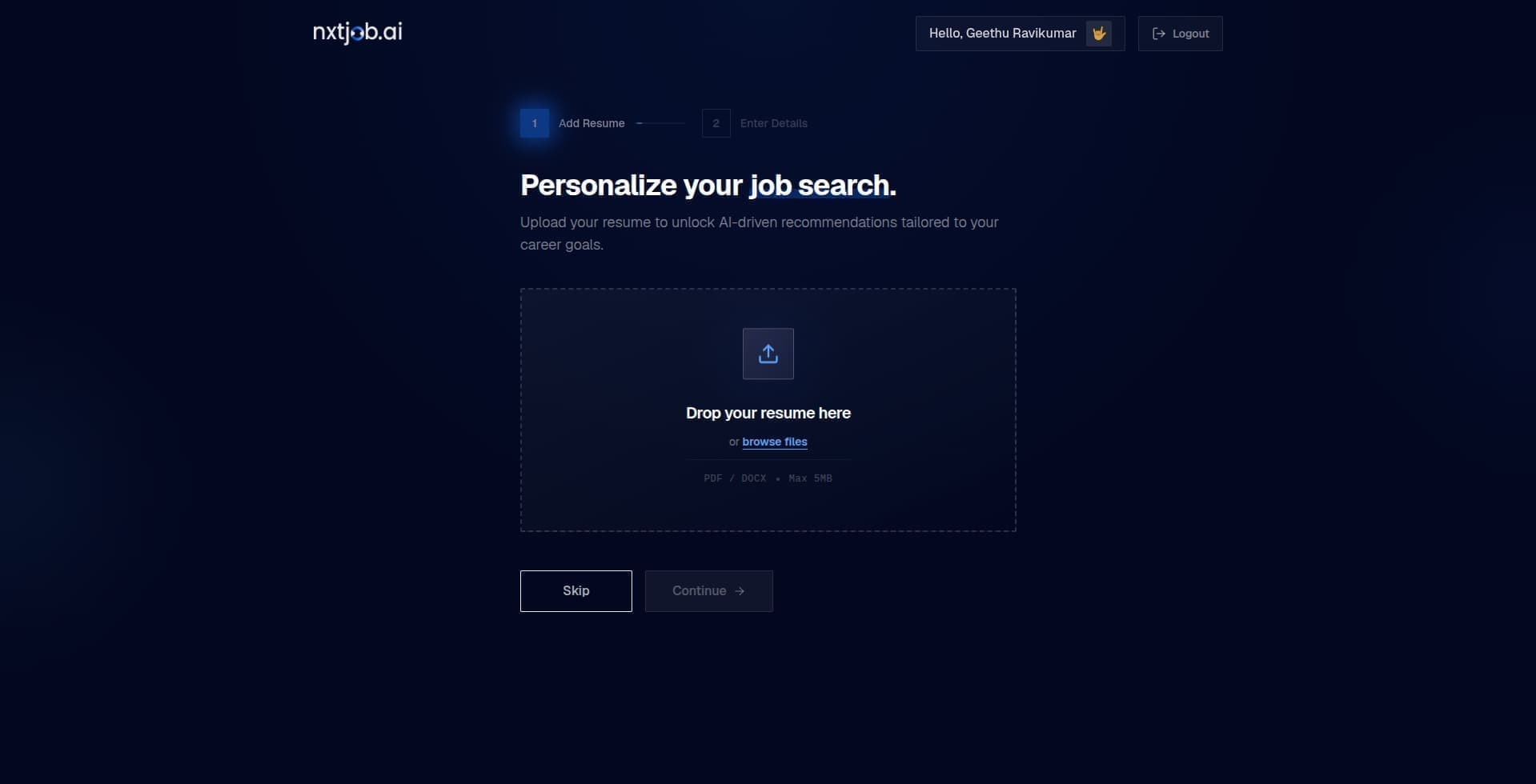
Step 1: Upload Your Existing Resume
Start by uploading your current resume to NxtJob.ai.
The tool reads your resume and pulls out key details such as your experience, skills, education, and professional background.
Step 2: Review and Update Your Experience
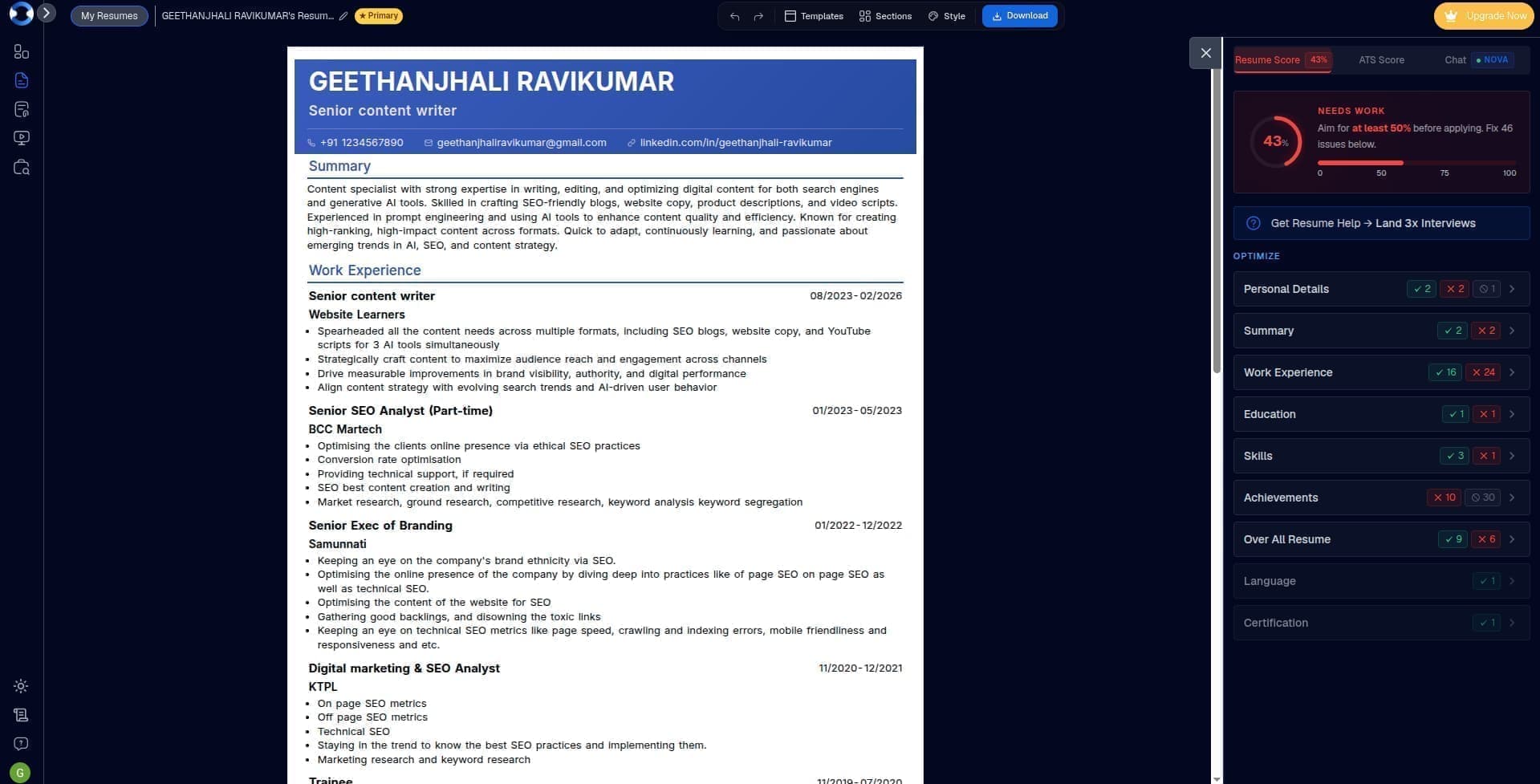
Once your resume is parsed, NxtJob.ai asks you to review and update your experience details.
This step matters because a strong resume depends on complete and clear information. You can improve your role details, add missing achievements, and make sure your experience is accurate.
Step 3: Create Your Master Resume
After your experience details are updated, NxtJob.ai helps create a master resume.
Think of this as your base resume. It contains your core experience, skills, and achievements in a cleaner structure.
But this master resume is not the final version for every job.
It gives NxtJob.ai the right base to create role-specific resumes later.
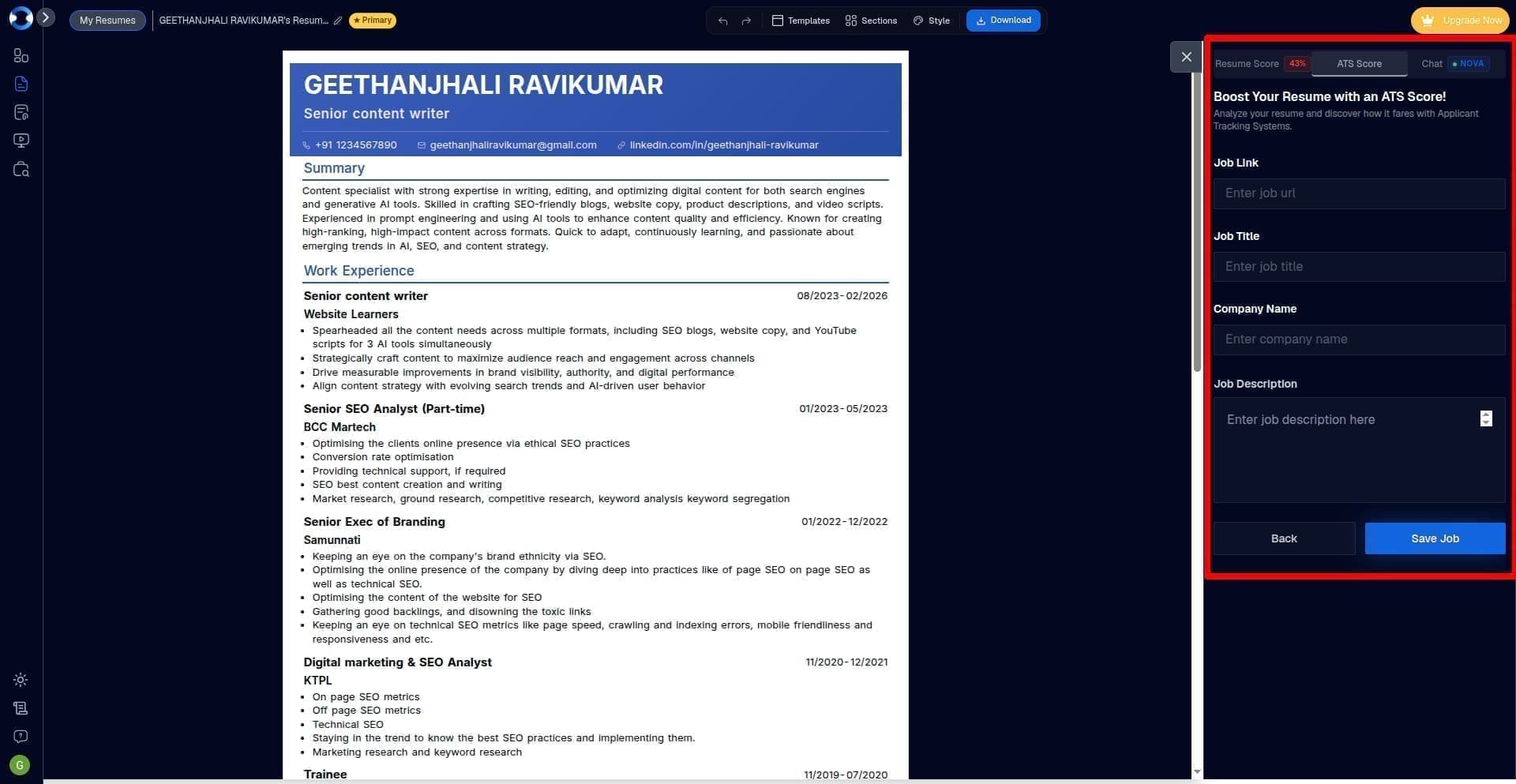
Step 4: Save or Add the Job You Want to Apply For
Next, choose the job you want to apply to.
You can save a job from your job search workflow or add a job manually.
This helps NxtJob.ai understand the role, job description, company needs, and keywords that matter for that application.
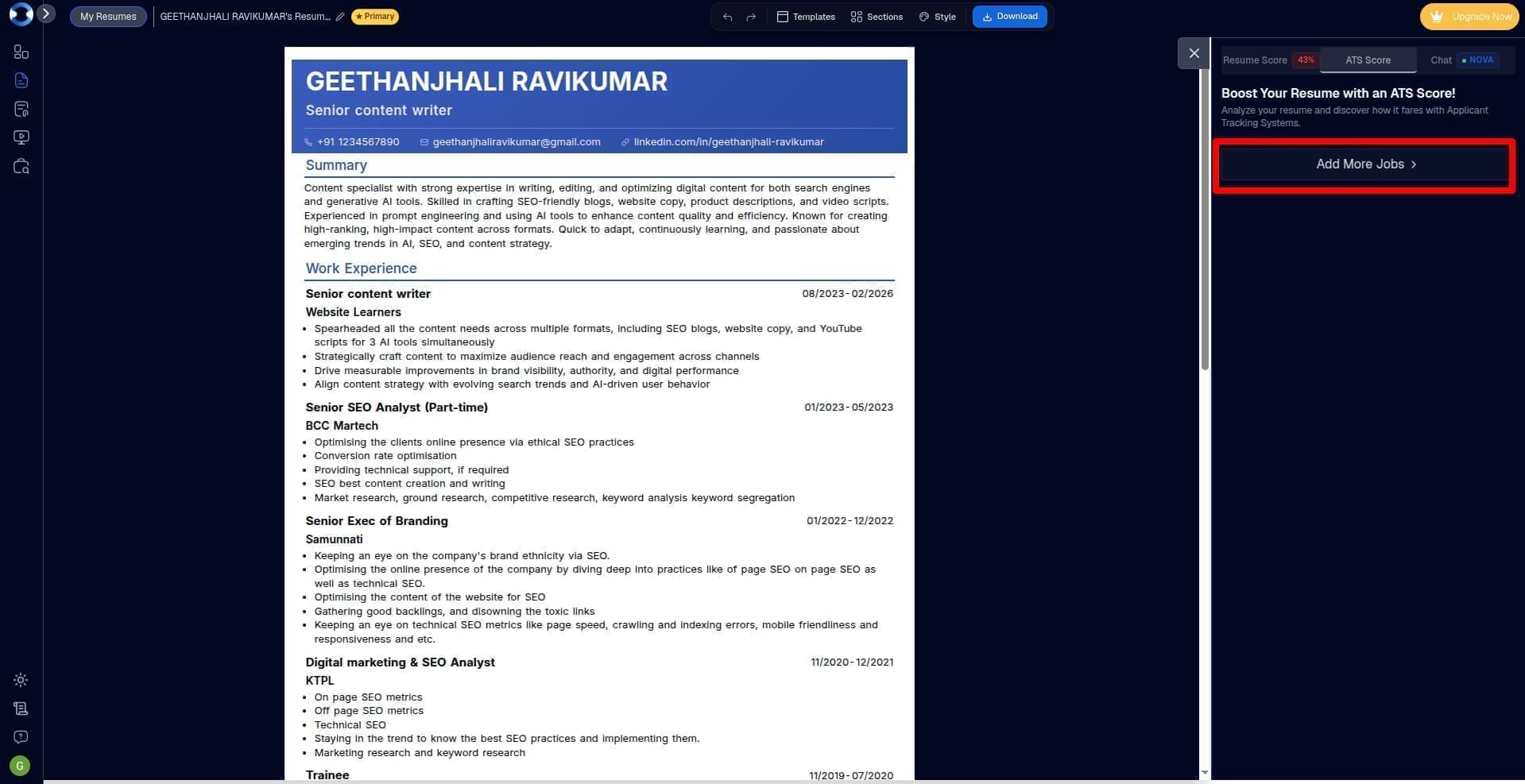
You can add jobs manually or add jobs via our job board by installing our Chrome Extension.
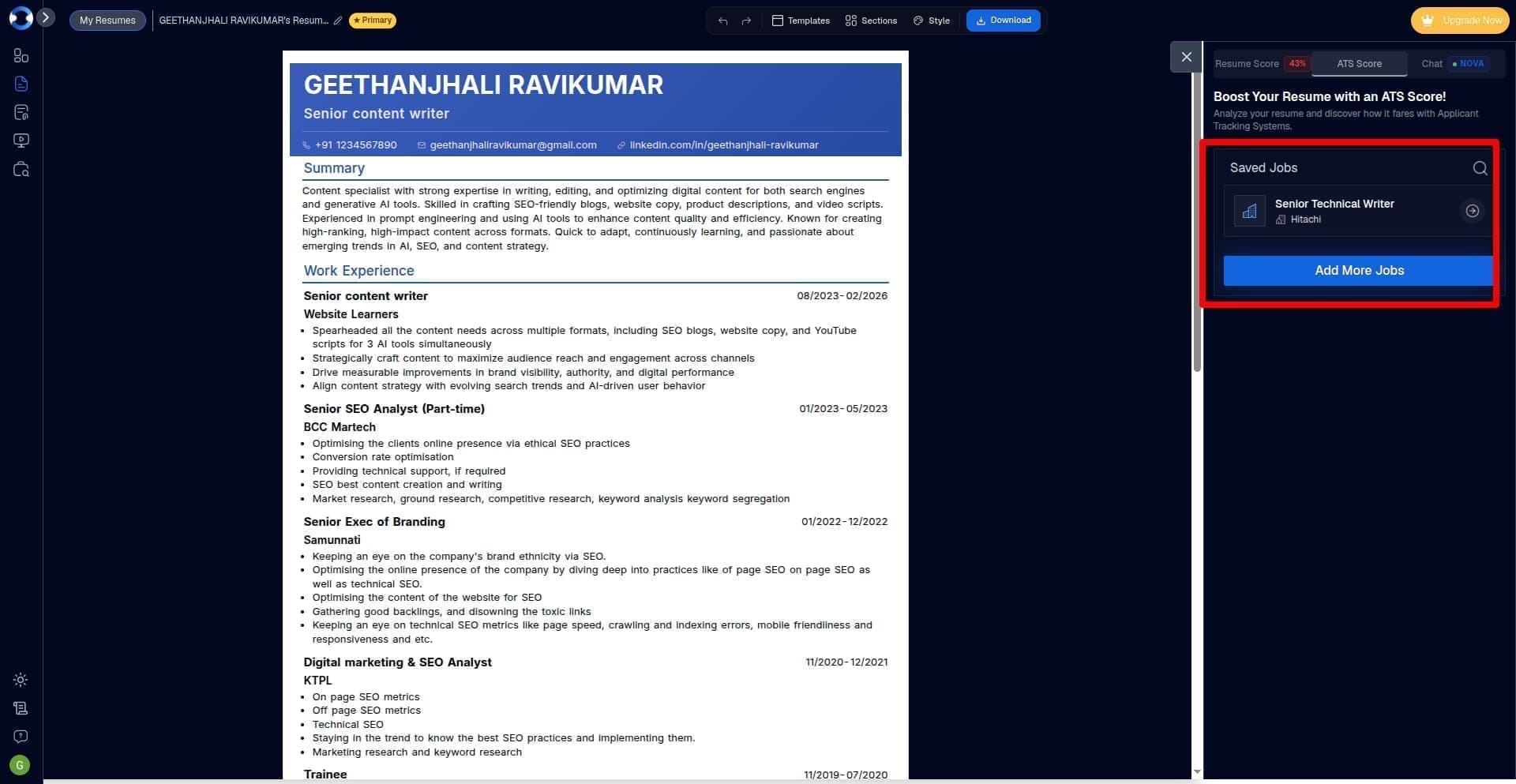
Once you’ve added your job, you’ll find it in the saved jobs section.
Step 5: Generate a Role-Specific Resume
Once the job is selected, NxtJob.ai helps create a new resume for that role.
The resume is built using your updated experience and the job details. This helps you move beyond a generic resume and create a version that is more relevant to the role you want.
The free plan lets you check your resume score. To create your resume, you might have to upgrade. Now, don't fret, Nxtjob.ai is not just another AI job tool, it is a guided and premium AI-powered job search platform that helps experienced professionals find hidden roles, tailor resumes, reach decision-makers, build win decks, prepare for interviews, and negotiate better offers. So trust me it is worth it.
Once you upgrade, you can check your resume’s ATS score for the job you added. Always aim for a 100 % ATS score.
You can click on the one-click ATS optimization to hasten the process.

Step 6: Download and Use Your New ATS-friendly Resume
After the resume is created, you can download it and use it for your application.
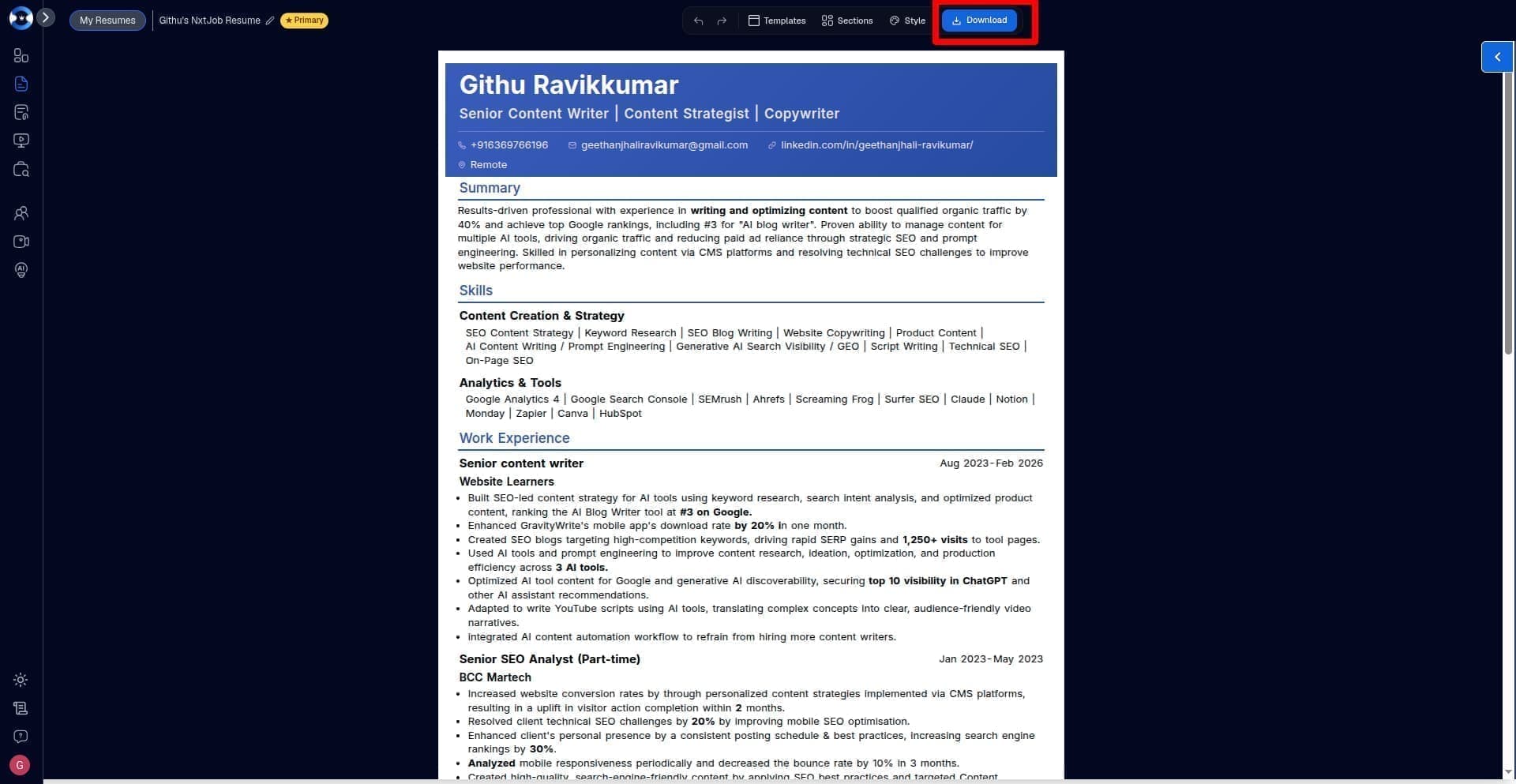
This saves time and helps you avoid sending the same broad resume to every job.
Create Your Resume with NxtJob.ai: Upload your existing resume, update your experience, and create a role-specific resume for the job you want to apply to.
Common Resume Mistakes That Hurt ATS Readability
Even a strong resume can lose impact if it is hard to read, too broad, or poorly matched to the role.
Here are the mistakes to avoid when creating an ATS-friendly resume.
1. Using Heavy Design
A resume with icons, graphics, skill bars, tables, and text boxes may look good, but it can create reading issues for some hiring systems.
Keep the design clean. Let your experience do the work.
2. Adding Important Details Inside Images
Do not place your name, contact details, skills, or work history inside images or design elements.
Hiring systems may not read those details well.
Keep all important information in normal text.
3. Using Unclear Section Headings
Creative headings can confuse both systems and recruiters.
Avoid headings like:
My Journey
Career Story
Where I Made an Impact
Things I Am Good At
Use simple headings like:
Professional Summary
Skills
Work Experience
Education
Certifications
4. Missing Resume Keywords
If the job description mentions skills, tools, responsibilities, or outcomes that match your real experience, your resume should include them.
But do not force keywords.
Use them in context, especially in your summary, skills, and work experience bullets.
5. Sending the Same Resume Everywhere
This is one of the biggest mistakes experienced professionals make.
A generic resume may show your full career, but it may not show why you fit a specific role.
Your resume should be adjusted for the role, company, and job description.
6. Writing Only Responsibilities
Many resumes read like a job description.
For example:
Responsible for managing client accounts.
That does not show value.
A stronger version would be:
Managed 18 key client accounts and improved renewal rate by 22% through structured follow-ups and quarterly business reviews.
Your resume should show what changed because of your work.
7. Using Vague Words
Words like “handled,” “worked on,” “helped with,” and “involved in” can make your work sound weak.
Use clearer action words like:
Led
Built
Improved
Reduced
Managed
Launched
Increased
Streamlined
Created
8. Adding Skills You Cannot Defend
Do not add skills only because they appear in the job description.
If a recruiter asks about that skill in an interview, you should be able to explain where and how you used it.
A good resume is not just optimized for search. It should also be honest and easy to defend.
9. Making the Resume Too Long Without Focus
Experienced professionals often have a lot to say. But a long resume is not always a strong resume. If every project, task, and old responsibility is included, the most important details can get buried.
Keep the resume focused on the role you want now.
10. Ignoring the Human Reader
ATS readability matters, but your resume is still meant for people.
Recruiters want to understand your fit fast.
Make sure your resume is clean, relevant, specific, and easy to scan.
11. Adding Your Photo to the Resume
Avoid adding your photo to an ATS-friendly resume unless the job post or country-specific hiring norm clearly asks for it.
A photo can create bias before the recruiter reviews your skills, experience, and achievements. It can also cause issues with some resume parsers because images may not be read correctly by hiring systems.
Your resume should keep the focus on your work, not your appearance.
Instead of adding a photo, use that space for stronger details like your professional summary, key skills, work impact, tools, certifications, or leadership experience.
Final ATS-Friendly Resume Checklist
Before you apply, use this checklist to review your resume.
Format and Readability
Is your resume easy to scan?
Have you used a clean, simple layout?
Are your section headings clear and standard?
Have you avoided tables, icons, images, skill bars, and text boxes?
Are your dates, job titles, and company names easy to find?
Have you used a standard font and enough spacing?
Contact Details
Is your name clearly visible?
Have you added your phone number and email address?
Have you included your LinkedIn profile?
Is your location mentioned clearly?
Are your contact details in normal text, not inside an image or header?
Summary and Skills
Does your summary match the role you are applying for?
Does it show your experience level, core strengths, and business value?
Have you included the right resume keywords from the job description?
Are the skills listed true to your actual experience?
Have you avoided long keyword lists with no context?
Work Experience
Is your latest role listed first?
Does each role include job title, company name, location, and dates?
Are your bullet points achievement-led?
Have you shown business impact where possible?
Have you included numbers, scope, team size, budget, revenue, or results?
Have you removed vague lines like “responsible for” and “worked on”?
Role Match
Is this resume tailored to the job description?
Have you highlighted the most relevant parts of your experience?
Have you removed details that do not support this role?
Does the resume show why you fit this specific job?
Can you explain every skill and claim in an interview?
Final Review
Have you checked for spelling and grammar errors?
Is the resume focused and easy to read?
Is it saved in the format requested by the job post?
Have you reviewed it once as a recruiter would?
Does it make your value clear in less than a minute?
An ATS-friendly resume should not only pass through systems. It should help the recruiter see your fit without effort.
Build a Resume That Gets Interview Calls
Your resume may have years of experience, strong achievements, and leadership exposure, but if it is not structured for modern hiring systems, recruiters may never even see it. An ATS-friendly resume is not about stuffing keywords or making your resume robotic. It is about making your experience easier to understand, easier to scan, and easier to match with the role you are applying for.
For senior professionals, this matters even more because your resume needs to communicate business impact, ownership, leadership, and relevance within seconds. A generic resume is no longer enough in a competitive market.
If you want to build a role-specific ATS-friendly resume without spending hours rewriting it for every job, NxtJob.ai can help. From resume tailoring and keyword optimization to interview preparation, recruiter outreach, and salary negotiation, NxtJob.ai helps experienced professionals run a smarter and more focused job search.

As a content writer and SEO strategist, I help turn complex AI job search, career-tech, and growth topics into clear, practical content. At NxtJob.ai, I write to help senior professionals make smarter career moves with clarity and confidence.
Githu Ravikkumar
Creative Strategist & Copywriter, Nxtjob
Recent articles

Resume
5 min read
ATS Resume Format: How to Create a Resume That Gets Past Applicant Tracking Systems
Learn how to create an ATS-friendly resume that passes through applicant tracking systems and increases your chances of landing an interview.
Resume
5 min read
ATS Resume Format: How to Create a Resume That Gets Past Applicant Tracking Systems
Learn how to create an ATS-friendly resume that passes through applicant tracking systems and increases your chances of landing an interview.
Resume
5 min read
ATS Resume Format: How to Create a Resume That Gets Past Applicant Tracking Systems
Learn how to create an ATS-friendly resume that passes through applicant tracking systems and increases your chances of landing an interview.
Resume
5 min read
ATS Resume Format: How to Create a Resume That Gets Past Applicant Tracking Systems
Learn how to create an ATS-friendly resume that passes through applicant tracking systems and increases your chances of landing an interview.
Resume
5 min read
ATS Resume Format: How to Create a Resume That Gets Past Applicant Tracking Systems
Learn how to create an ATS-friendly resume that passes through applicant tracking systems and increases your chances of landing an interview.
Resume
5 min read
ATS Resume Format: How to Create a Resume That Gets Past Applicant Tracking Systems
Learn how to create an ATS-friendly resume that passes through applicant tracking systems and increases your chances of landing an interview.
Everything you need to know
Here you can find solutions to all your queries.
Resume
13 min read
How to Make an ATS-Friendly Resume: Format, Tips, and Examples for Experienced Professionals
Published Date:
|
Last Modified:
Your resume can have the right experience and still get ignored.
Not because you are unqualified, but because it may be hard to read, too broad for the role, or missing the right resume keywords.
That is why learning how to make an ATS-friendly resume matters.
An ATS-friendly resume is not about stuffing keywords or trying to trick software. It is about creating a clean, clear, and role-specific resume that hiring systems can read and recruiters can understand.
For experienced professionals, format alone is not enough. Your resume should also show business impact, relevant skills, and proof that you fit the role.
Create Your Resume with NxtJob.ai: Upload your existing resume, update your experience, and create a role-specific resume for your next application.
What Is an ATS-Friendly Resume
An ATS-friendly resume is a resume that hiring systems can read without missing important details.
ATS stands for Applicant Tracking System. Companies use it to collect, scan, sort, and manage resumes before recruiters review them.
If your resume has complex formatting, unclear section names, missing keywords, or details placed inside images, the system may not read it well. That can hurt your chances before a recruiter even sees your profile.
But an ATS-friendly resume is not only for software.
It should also help recruiters understand your experience fast.
A strong ATS-friendly resume usually has:
A clean layout
Simple section headings
Clear job titles
Relevant resume keywords
Easy-to-read bullet points
Work experience matched to the role
Proof of achievements and business impact
For experienced professionals, this matters even more. You may have strong experience, but if the resume is too broad or hard to scan, your value can get lost.
The goal is simple: Make your resume easy for hiring systems to read and easy for recruiters to trust.
Why Experienced Professionals Need More Than a Basic ATS Resume
A basic ATS resume can help your details get read.
But for experienced professionals, that is only the starting point.
When you have 15+ years of experience, your resume has to do more than list job titles and skills. It needs to show your scope, seniority, business impact, and relevance to the role.
You may have handled teams, budgets, processes, clients, revenue, projects, or cross-functional work. But if your resume reads like a long task list, that experience can look weaker than it is.
A strong experienced professional resume should show:
What you owned
What problems you solved
What changed because of your work
How large your scope was
Which teams, tools, or budgets you handled
What results you helped create
Why your experience fits the role
For example, this is too basic:
Managed marketing campaigns for the company.
This is stronger:
Led SEO, email, and paid campaigns for a B2B brand, improving qualified lead flow by 32% in six months.
Both lines describe marketing work. But the second line shows action, scope, and result.
That is what experienced professionals need.
Your resume should not dump every detail from your career. It should make the right details easy to find. The goal is to show the experience that matters most for the job you want.
The 6 Things That Make a Resume ATS-Friendly
An ATS-friendly resume is not just a resume with a plain design.
It is a resume that is easy to read, easy to scan, and easy to match with the job description.
Here are the main things that make a resume ATS-friendly:
1. Clean Structure
Use a simple layout with clear sections.
Avoid heavy design, tables, icons, images, text boxes, and skill bars. These may look good, but they can make your resume harder for some hiring systems to read.
2. Clear Section Headings
Use standard headings like:
Professional Summary
Skills
Work Experience
Education
Certifications
Tools
Avoid creative headings like “My Journey” or “Where I Made an Impact.” They may sound interesting, but they are harder to scan.
3. Relevant Resume Keywords
Resume keywords help connect your profile to the job description.
These keywords can include skills, tools, job titles, industry terms, responsibilities, and business outcomes.
For example, if the job description mentions “stakeholder management,” “budget planning,” “process improvement,” or “CRM tools,” and you have that experience, those terms should appear naturally in your resume.
4. Complete Work History
Your resume should clearly show your job title, company name, dates, and key work for each role.
For experienced professionals, this helps recruiters understand your career growth, seniority, and recent scope of work.
5. Achievement-Led Bullet Points
Do not only list what you handled.
Show what changed because of your work.
Weak:
Managed operations for the team.
Strong:
Improved team delivery timelines by 24% by redesigning weekly planning, vendor coordination, and reporting workflows.
The stronger version shows action, scope, and result.
6. Role-Specific Match
A resume can be clean and still be too broad.
An ATS-friendly resume should match the role you are applying for.
You might have worked with a Silicon Valley company, but if your resume doesn’t match the job description you will be rejected.
That does not mean adding fake skills. It means choosing the most relevant parts of your experience for that job.
For experienced professionals, the best resume is not the one that includes everything.
It is the one that makes the right experience easy to find.
Best ATS Resume Format & Structure for Experienced Professionals
The best ATS resume format for experienced professionals is simple, clear, and easy to scan.
In most cases, use a reverse chronological format. This means your latest role comes first, followed by your previous roles in order.
This format works well because it helps recruiters understand your recent experience, career growth, and current level fast.
A strong ATS resume format should include:
Name and contact details
Professional summary
Core skills
Work experience
Education
Certifications
Tools or technical skills
Keep the layout clean. Use simple headings, clear dates, and bullet points. Choose standard fonts like Arial, Calibri, or Times New Roman.
Avoid design elements that may confuse hiring systems, such as:
Tables
Text boxes
Icons
Images
Skill bars
Heavy graphics
Two-column layouts
Fancy fonts
Important details in headers or footers
For file format, follow the job post instructions. If the company asks for a PDF, send a PDF. If they ask for DOCX, send DOCX. If no format is mentioned, PDF is often the safer choice, though many modern systems can read DOCX too.
For experienced professionals, the goal is not to make the resume look fancy.
The goal is to make your experience easy to read, easy to match with the role, and clear enough for a recruiter to trust.
Once the format is clean, arrange your resume in a simple order.
This is not about using a fancy template. It is about placing the right details where hiring systems and recruiters expect to find them.
A good ATS resume format usually follows this structure:
1. Contact Details
Add your:
Full name
Phone number
Email address
LinkedIn profile
Location
Keep this section plain. Do not place your contact details inside an image, table, or header.
2. Professional Summary
Write 2 to 4 lines that explain your role, years of experience, key strengths, and business value.
Example:
Marketing leader with 10+ years of experience in SEO, content strategy, demand generation, and team management. Experienced in building growth systems, improving lead quality, and leading cross-functional marketing projects for B2B brands.
3. Core Skills
Add skills that match the job description and your real experience.
Example:
SEO strategy | Content marketing | Demand generation | Team leadership | Campaign planning | Marketing analytics
This section helps hiring systems and recruiters understand your fit fast.
4. Work Experience
List your work experience in reverse chronological order.
For each role, include:
Job title
Company name
Location
Employment dates
4 to 6 achievement-led bullet points
Your bullet points should not only explain what you handled. They should show what improved because of your work.
Weak:
Responsible for managing a sales team.
Strong:
Led a 12-member sales team across South India, improving quarterly revenue by 18% through better territory planning and lead follow-up.
5. Education
Add your degree, college or university name, and graduation year if needed.
If you have many years of experience, keep this section short unless your education is important for the role.
6. Certifications
Add certifications that support your target role.
Example:
PMP | Google Analytics Certification | AWS Certified Solutions Architect | HubSpot Content Marketing
7. Tools and Technical Skills
Add tools, platforms, and technical skills that are relevant to the job.
Example:
Salesforce | HubSpot | Google Analytics | Power BI | Excel | Jira | WordPress
For experienced professionals, this structure keeps the resume clear, complete, and easy to scan. It also makes your experience easier to match with the job you want.
How to Use Resume Keywords Without Keyword Stuffing
Resume keywords are the words and phrases that connect your experience to the job description.
They can include:
Job titles
Skills
Tools
Certifications
Industry terms
Responsibilities
Leadership terms
Business outcomes
For example, if a job description mentions stakeholder management, budget planning, process improvement, CRM tools, or team leadership, and you have that experience, those terms should appear in your resume.
But do not add keywords just to please the ATS.
Your resume should still sound real.
Bad keyword use:
SEO, content marketing, analytics, lead generation, campaign planning, team management, growth strategy.
Better keyword use:
Led SEO, content marketing, and campaign planning for a B2B brand, improving qualified lead generation by 32% in six months.
The second version uses resume keywords, but it also shows what you did and what changed because of your work.
You can add resume keywords in your:
Professional summary
Core skills section
Work experience bullets
Tools section
Certifications section
Avoid fake skills, hidden text, and long keyword lists that do not match your actual work.
A good ATS-friendly resume should use keywords with context. That means every keyword should connect to real experience, real work, or a result you can explain in an interview.
Why Does One Resume Not Work for Every Job
A master resume is useful.
It helps you keep your full experience, skills, achievements, tools, and career details in one place. But your master resume should not be the final resume you send to every company.
Each job has different priorities.
One role may care more about team leadership. Another may care more about revenue growth. Another may focus on process improvement, client handling, technical skills, or stakeholder management.
If you send the same resume everywhere, you may miss what each role is really asking for.
That is where resume tailoring matters.
Tailoring does not mean lying. It means choosing the most relevant proof from your experience and placing it where recruiters can see it fast.
For example:
For a Head of Marketing role, highlight strategy, team leadership, revenue impact, and planning.
For a Demand Generation role, highlight pipeline growth, campaigns, tools, and conversion metrics.
For a Content Lead role, highlight SEO, content systems, brand voice, and team workflows.
The experience may come from the same career. But the focus changes based on the role.
That is why a strong ATS-friendly resume should not be generic. It should be matched to the job description, easy for hiring systems to read, and clear enough for recruiters to understand why you fit that specific role.
Create Your Resume with NxtJob.ai: Upload your existing resume, update your experience, and create a role-specific resume for the job you want to apply to.
How NxtJob.ai Helps You Create a Role-Specific Resume
Creating an ATS-friendly resume for every job manually can take time. You need to read the job description, find the right resume keywords, update your experience, rewrite bullet points, and make sure the resume still feels true to your career.
NxtJob.ai helps make this easier by turning your existing resume into a role-specific resume you can use for a saved or added job.
Step 1: Upload Your Existing Resume
Start by uploading your current resume to NxtJob.ai.
The tool reads your resume and pulls out key details such as your experience, skills, education, and professional background.
Step 2: Review and Update Your Experience
Once your resume is parsed, NxtJob.ai asks you to review and update your experience details.
This step matters because a strong resume depends on complete and clear information. You can improve your role details, add missing achievements, and make sure your experience is accurate.
Step 3: Create Your Master Resume
After your experience details are updated, NxtJob.ai helps create a master resume.
Think of this as your base resume. It contains your core experience, skills, and achievements in a cleaner structure.
But this master resume is not the final version for every job.
It gives NxtJob.ai the right base to create role-specific resumes later.
Step 4: Save or Add the Job You Want to Apply For
Next, choose the job you want to apply to.
You can save a job from your job search workflow or add a job manually.
This helps NxtJob.ai understand the role, job description, company needs, and keywords that matter for that application.
You can add jobs manually or add jobs via our job board by installing our Chrome Extension.
Once you’ve added your job, you’ll find it in the saved jobs section.
Step 5: Generate a Role-Specific Resume
Once the job is selected, NxtJob.ai helps create a new resume for that role.
The resume is built using your updated experience and the job details. This helps you move beyond a generic resume and create a version that is more relevant to the role you want.
The free plan lets you check your resume score. To create your resume, you might have to upgrade. Now, don't fret, Nxtjob.ai is not just another AI job tool, it is a guided and premium AI-powered job search platform that helps experienced professionals find hidden roles, tailor resumes, reach decision-makers, build win decks, prepare for interviews, and negotiate better offers. So trust me it is worth it.
Once you upgrade, you can check your resume’s ATS score for the job you added. Always aim for a 100 % ATS score.
You can click on the one-click ATS optimization to hasten the process.
Step 6: Download and Use Your New ATS-friendly Resume
After the resume is created, you can download it and use it for your application.
This saves time and helps you avoid sending the same broad resume to every job.
Create Your Resume with NxtJob.ai: Upload your existing resume, update your experience, and create a role-specific resume for the job you want to apply to.
Common Resume Mistakes That Hurt ATS Readability
Even a strong resume can lose impact if it is hard to read, too broad, or poorly matched to the role.
Here are the mistakes to avoid when creating an ATS-friendly resume.
1. Using Heavy Design
A resume with icons, graphics, skill bars, tables, and text boxes may look good, but it can create reading issues for some hiring systems.
Keep the design clean. Let your experience do the work.
2. Adding Important Details Inside Images
Do not place your name, contact details, skills, or work history inside images or design elements.
Hiring systems may not read those details well.
Keep all important information in normal text.
3. Using Unclear Section Headings
Creative headings can confuse both systems and recruiters.
Avoid headings like:
My Journey
Career Story
Where I Made an Impact
Things I Am Good At
Use simple headings like:
Professional Summary
Skills
Work Experience
Education
Certifications
4. Missing Resume Keywords
If the job description mentions skills, tools, responsibilities, or outcomes that match your real experience, your resume should include them.
But do not force keywords.
Use them in context, especially in your summary, skills, and work experience bullets.
5. Sending the Same Resume Everywhere
This is one of the biggest mistakes experienced professionals make.
A generic resume may show your full career, but it may not show why you fit a specific role.
Your resume should be adjusted for the role, company, and job description.
6. Writing Only Responsibilities
Many resumes read like a job description.
For example:
Responsible for managing client accounts.
That does not show value.
A stronger version would be:
Managed 18 key client accounts and improved renewal rate by 22% through structured follow-ups and quarterly business reviews.
Your resume should show what changed because of your work.
7. Using Vague Words
Words like “handled,” “worked on,” “helped with,” and “involved in” can make your work sound weak.
Use clearer action words like:
Led
Built
Improved
Reduced
Managed
Launched
Increased
Streamlined
Created
8. Adding Skills You Cannot Defend
Do not add skills only because they appear in the job description.
If a recruiter asks about that skill in an interview, you should be able to explain where and how you used it.
A good resume is not just optimized for search. It should also be honest and easy to defend.
9. Making the Resume Too Long Without Focus
Experienced professionals often have a lot to say. But a long resume is not always a strong resume. If every project, task, and old responsibility is included, the most important details can get buried.
Keep the resume focused on the role you want now.
10. Ignoring the Human Reader
ATS readability matters, but your resume is still meant for people.
Recruiters want to understand your fit fast.
Make sure your resume is clean, relevant, specific, and easy to scan.
11. Adding Your Photo to the Resume
Avoid adding your photo to an ATS-friendly resume unless the job post or country-specific hiring norm clearly asks for it.
A photo can create bias before the recruiter reviews your skills, experience, and achievements. It can also cause issues with some resume parsers because images may not be read correctly by hiring systems.
Your resume should keep the focus on your work, not your appearance.
Instead of adding a photo, use that space for stronger details like your professional summary, key skills, work impact, tools, certifications, or leadership experience.
Final ATS-Friendly Resume Checklist
Before you apply, use this checklist to review your resume.
Format and Readability
Is your resume easy to scan?
Have you used a clean, simple layout?
Are your section headings clear and standard?
Have you avoided tables, icons, images, skill bars, and text boxes?
Are your dates, job titles, and company names easy to find?
Have you used a standard font and enough spacing?
Contact Details
Is your name clearly visible?
Have you added your phone number and email address?
Have you included your LinkedIn profile?
Is your location mentioned clearly?
Are your contact details in normal text, not inside an image or header?
Summary and Skills
Does your summary match the role you are applying for?
Does it show your experience level, core strengths, and business value?
Have you included the right resume keywords from the job description?
Are the skills listed true to your actual experience?
Have you avoided long keyword lists with no context?
Work Experience
Is your latest role listed first?
Does each role include job title, company name, location, and dates?
Are your bullet points achievement-led?
Have you shown business impact where possible?
Have you included numbers, scope, team size, budget, revenue, or results?
Have you removed vague lines like “responsible for” and “worked on”?
Role Match
Is this resume tailored to the job description?
Have you highlighted the most relevant parts of your experience?
Have you removed details that do not support this role?
Does the resume show why you fit this specific job?
Can you explain every skill and claim in an interview?
Final Review
Have you checked for spelling and grammar errors?
Is the resume focused and easy to read?
Is it saved in the format requested by the job post?
Have you reviewed it once as a recruiter would?
Does it make your value clear in less than a minute?
An ATS-friendly resume should not only pass through systems. It should help the recruiter see your fit without effort.
Build a Resume That Gets Interview Calls
Your resume may have years of experience, strong achievements, and leadership exposure, but if it is not structured for modern hiring systems, recruiters may never even see it. An ATS-friendly resume is not about stuffing keywords or making your resume robotic. It is about making your experience easier to understand, easier to scan, and easier to match with the role you are applying for.
For senior professionals, this matters even more because your resume needs to communicate business impact, ownership, leadership, and relevance within seconds. A generic resume is no longer enough in a competitive market.
If you want to build a role-specific ATS-friendly resume without spending hours rewriting it for every job, NxtJob.ai can help. From resume tailoring and keyword optimization to interview preparation, recruiter outreach, and salary negotiation, NxtJob.ai helps experienced professionals run a smarter and more focused job search.
Table of content

Interview
Behavioral interview questions & answers for senior leaders
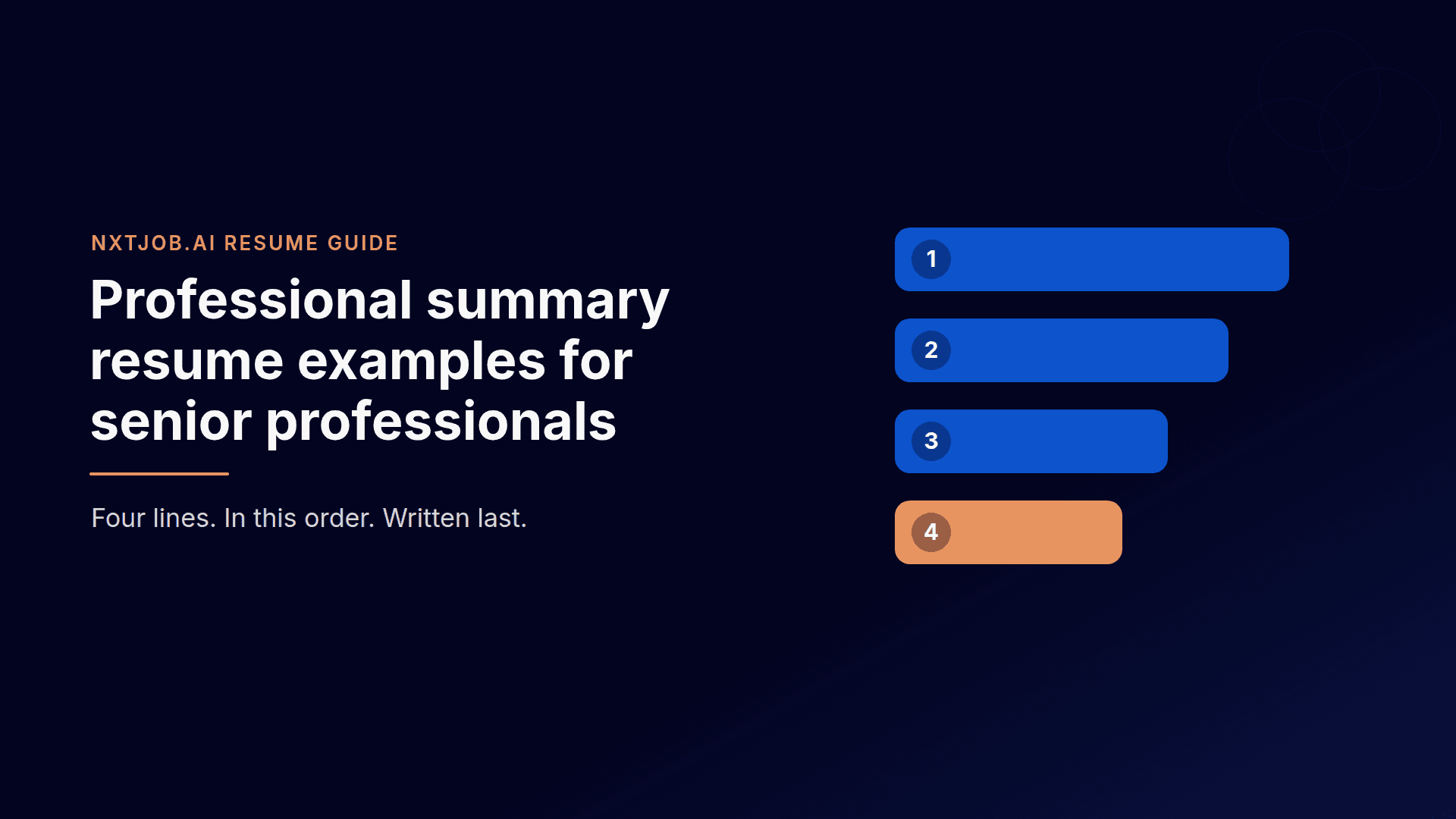
A senior resume summary is four lines: your level, your scope, one proven result, and the role you want. Here is the formula, five examples, and a rewrite you can copy tonight.
Resume
Professional Summary Resumes to Grab Recruiters' Attention
A senior resume summary is four lines: your level, your scope, one proven result, and the role you want. Here is the formula, five examples, and a rewrite you can copy tonight.
As a content writer and SEO strategist, I help turn complex AI job search, career-tech, and growth topics into clear, practical content. At NxtJob.ai, I write to help senior professionals make smarter career moves with clarity and confidence.
Githu Ravikkumar
Creative Strategist & Copywriter, Nxtjob
Everything you need to know
Here you can find solutions to all your queries.
Resume
13 min read
Published Date:
|
Last Modified:
How to Make an ATS-Friendly Resume: Format, Tips, and Examples for Experienced Professionals
Your resume can have the right experience and still get ignored.
Not because you are unqualified, but because it may be hard to read, too broad for the role, or missing the right resume keywords.
That is why learning how to make an ATS-friendly resume matters.
An ATS-friendly resume is not about stuffing keywords or trying to trick software. It is about creating a clean, clear, and role-specific resume that hiring systems can read and recruiters can understand.
For experienced professionals, format alone is not enough. Your resume should also show business impact, relevant skills, and proof that you fit the role.
Create Your Resume with NxtJob.ai: Upload your existing resume, update your experience, and create a role-specific resume for your next application.
What Is an ATS-Friendly Resume
An ATS-friendly resume is a resume that hiring systems can read without missing important details.
ATS stands for Applicant Tracking System. Companies use it to collect, scan, sort, and manage resumes before recruiters review them.
If your resume has complex formatting, unclear section names, missing keywords, or details placed inside images, the system may not read it well. That can hurt your chances before a recruiter even sees your profile.
But an ATS-friendly resume is not only for software.
It should also help recruiters understand your experience fast.
A strong ATS-friendly resume usually has:
A clean layout
Simple section headings
Clear job titles
Relevant resume keywords
Easy-to-read bullet points
Work experience matched to the role
Proof of achievements and business impact
For experienced professionals, this matters even more. You may have strong experience, but if the resume is too broad or hard to scan, your value can get lost.
The goal is simple: Make your resume easy for hiring systems to read and easy for recruiters to trust.
Why Experienced Professionals Need More Than a Basic ATS Resume
A basic ATS resume can help your details get read.
But for experienced professionals, that is only the starting point.
When you have 15+ years of experience, your resume has to do more than list job titles and skills. It needs to show your scope, seniority, business impact, and relevance to the role.
You may have handled teams, budgets, processes, clients, revenue, projects, or cross-functional work. But if your resume reads like a long task list, that experience can look weaker than it is.
A strong experienced professional resume should show:
What you owned
What problems you solved
What changed because of your work
How large your scope was
Which teams, tools, or budgets you handled
What results you helped create
Why your experience fits the role
For example, this is too basic:
Managed marketing campaigns for the company.
This is stronger:
Led SEO, email, and paid campaigns for a B2B brand, improving qualified lead flow by 32% in six months.
Both lines describe marketing work. But the second line shows action, scope, and result.
That is what experienced professionals need.
Your resume should not dump every detail from your career. It should make the right details easy to find. The goal is to show the experience that matters most for the job you want.
The 6 Things That Make a Resume ATS-Friendly
An ATS-friendly resume is not just a resume with a plain design.
It is a resume that is easy to read, easy to scan, and easy to match with the job description.
Here are the main things that make a resume ATS-friendly:
1. Clean Structure
Use a simple layout with clear sections.
Avoid heavy design, tables, icons, images, text boxes, and skill bars. These may look good, but they can make your resume harder for some hiring systems to read.
2. Clear Section Headings
Use standard headings like:
Professional Summary
Skills
Work Experience
Education
Certifications
Tools
Avoid creative headings like “My Journey” or “Where I Made an Impact.” They may sound interesting, but they are harder to scan.
3. Relevant Resume Keywords
Resume keywords help connect your profile to the job description.
These keywords can include skills, tools, job titles, industry terms, responsibilities, and business outcomes.
For example, if the job description mentions “stakeholder management,” “budget planning,” “process improvement,” or “CRM tools,” and you have that experience, those terms should appear naturally in your resume.
4. Complete Work History
Your resume should clearly show your job title, company name, dates, and key work for each role.
For experienced professionals, this helps recruiters understand your career growth, seniority, and recent scope of work.
5. Achievement-Led Bullet Points
Do not only list what you handled.
Show what changed because of your work.
Weak:
Managed operations for the team.
Strong:
Improved team delivery timelines by 24% by redesigning weekly planning, vendor coordination, and reporting workflows.
The stronger version shows action, scope, and result.
6. Role-Specific Match
A resume can be clean and still be too broad.
An ATS-friendly resume should match the role you are applying for.
You might have worked with a Silicon Valley company, but if your resume doesn’t match the job description you will be rejected.
That does not mean adding fake skills. It means choosing the most relevant parts of your experience for that job.
For experienced professionals, the best resume is not the one that includes everything.
It is the one that makes the right experience easy to find.
Best ATS Resume Format & Structure for Experienced Professionals
The best ATS resume format for experienced professionals is simple, clear, and easy to scan.
In most cases, use a reverse chronological format. This means your latest role comes first, followed by your previous roles in order.
This format works well because it helps recruiters understand your recent experience, career growth, and current level fast.
A strong ATS resume format should include:
Name and contact details
Professional summary
Core skills
Work experience
Education
Certifications
Tools or technical skills
Keep the layout clean. Use simple headings, clear dates, and bullet points. Choose standard fonts like Arial, Calibri, or Times New Roman.
Avoid design elements that may confuse hiring systems, such as:
Tables
Text boxes
Icons
Images
Skill bars
Heavy graphics
Two-column layouts
Fancy fonts
Important details in headers or footers
For file format, follow the job post instructions. If the company asks for a PDF, send a PDF. If they ask for DOCX, send DOCX. If no format is mentioned, PDF is often the safer choice, though many modern systems can read DOCX too.
For experienced professionals, the goal is not to make the resume look fancy.
The goal is to make your experience easy to read, easy to match with the role, and clear enough for a recruiter to trust.
Once the format is clean, arrange your resume in a simple order.
This is not about using a fancy template. It is about placing the right details where hiring systems and recruiters expect to find them.
A good ATS resume format usually follows this structure:
1. Contact Details
Add your:
Full name
Phone number
Email address
LinkedIn profile
Location
Keep this section plain. Do not place your contact details inside an image, table, or header.
2. Professional Summary
Write 2 to 4 lines that explain your role, years of experience, key strengths, and business value.
Example:
Marketing leader with 10+ years of experience in SEO, content strategy, demand generation, and team management. Experienced in building growth systems, improving lead quality, and leading cross-functional marketing projects for B2B brands.
3. Core Skills
Add skills that match the job description and your real experience.
Example:
SEO strategy | Content marketing | Demand generation | Team leadership | Campaign planning | Marketing analytics
This section helps hiring systems and recruiters understand your fit fast.
4. Work Experience
List your work experience in reverse chronological order.
For each role, include:
Job title
Company name
Location
Employment dates
4 to 6 achievement-led bullet points
Your bullet points should not only explain what you handled. They should show what improved because of your work.
Weak:
Responsible for managing a sales team.
Strong:
Led a 12-member sales team across South India, improving quarterly revenue by 18% through better territory planning and lead follow-up.
5. Education
Add your degree, college or university name, and graduation year if needed.
If you have many years of experience, keep this section short unless your education is important for the role.
6. Certifications
Add certifications that support your target role.
Example:
PMP | Google Analytics Certification | AWS Certified Solutions Architect | HubSpot Content Marketing
7. Tools and Technical Skills
Add tools, platforms, and technical skills that are relevant to the job.
Example:
Salesforce | HubSpot | Google Analytics | Power BI | Excel | Jira | WordPress
For experienced professionals, this structure keeps the resume clear, complete, and easy to scan. It also makes your experience easier to match with the job you want.
How to Use Resume Keywords Without Keyword Stuffing
Resume keywords are the words and phrases that connect your experience to the job description.
They can include:
Job titles
Skills
Tools
Certifications
Industry terms
Responsibilities
Leadership terms
Business outcomes
For example, if a job description mentions stakeholder management, budget planning, process improvement, CRM tools, or team leadership, and you have that experience, those terms should appear in your resume.
But do not add keywords just to please the ATS.
Your resume should still sound real.
Bad keyword use:
SEO, content marketing, analytics, lead generation, campaign planning, team management, growth strategy.
Better keyword use:
Led SEO, content marketing, and campaign planning for a B2B brand, improving qualified lead generation by 32% in six months.
The second version uses resume keywords, but it also shows what you did and what changed because of your work.
You can add resume keywords in your:
Professional summary
Core skills section
Work experience bullets
Tools section
Certifications section
Avoid fake skills, hidden text, and long keyword lists that do not match your actual work.
A good ATS-friendly resume should use keywords with context. That means every keyword should connect to real experience, real work, or a result you can explain in an interview.
Why Does One Resume Not Work for Every Job
A master resume is useful.
It helps you keep your full experience, skills, achievements, tools, and career details in one place. But your master resume should not be the final resume you send to every company.
Each job has different priorities.
One role may care more about team leadership. Another may care more about revenue growth. Another may focus on process improvement, client handling, technical skills, or stakeholder management.
If you send the same resume everywhere, you may miss what each role is really asking for.
That is where resume tailoring matters.
Tailoring does not mean lying. It means choosing the most relevant proof from your experience and placing it where recruiters can see it fast.
For example:
For a Head of Marketing role, highlight strategy, team leadership, revenue impact, and planning.
For a Demand Generation role, highlight pipeline growth, campaigns, tools, and conversion metrics.
For a Content Lead role, highlight SEO, content systems, brand voice, and team workflows.
The experience may come from the same career. But the focus changes based on the role.
That is why a strong ATS-friendly resume should not be generic. It should be matched to the job description, easy for hiring systems to read, and clear enough for recruiters to understand why you fit that specific role.
Create Your Resume with NxtJob.ai: Upload your existing resume, update your experience, and create a role-specific resume for the job you want to apply to.
How NxtJob.ai Helps You Create a Role-Specific Resume
Creating an ATS-friendly resume for every job manually can take time. You need to read the job description, find the right resume keywords, update your experience, rewrite bullet points, and make sure the resume still feels true to your career.
NxtJob.ai helps make this easier by turning your existing resume into a role-specific resume you can use for a saved or added job.
Step 1: Upload Your Existing Resume
Start by uploading your current resume to NxtJob.ai.
The tool reads your resume and pulls out key details such as your experience, skills, education, and professional background.
Step 2: Review and Update Your Experience
Once your resume is parsed, NxtJob.ai asks you to review and update your experience details.
This step matters because a strong resume depends on complete and clear information. You can improve your role details, add missing achievements, and make sure your experience is accurate.
Step 3: Create Your Master Resume
After your experience details are updated, NxtJob.ai helps create a master resume.
Think of this as your base resume. It contains your core experience, skills, and achievements in a cleaner structure.
But this master resume is not the final version for every job.
It gives NxtJob.ai the right base to create role-specific resumes later.
Step 4: Save or Add the Job You Want to Apply For
Next, choose the job you want to apply to.
You can save a job from your job search workflow or add a job manually.
This helps NxtJob.ai understand the role, job description, company needs, and keywords that matter for that application.
You can add jobs manually or add jobs via our job board by installing our Chrome Extension.
Once you’ve added your job, you’ll find it in the saved jobs section.
Step 5: Generate a Role-Specific Resume
Once the job is selected, NxtJob.ai helps create a new resume for that role.
The resume is built using your updated experience and the job details. This helps you move beyond a generic resume and create a version that is more relevant to the role you want.
The free plan lets you check your resume score. To create your resume, you might have to upgrade. Now, don't fret, Nxtjob.ai is not just another AI job tool, it is a guided and premium AI-powered job search platform that helps experienced professionals find hidden roles, tailor resumes, reach decision-makers, build win decks, prepare for interviews, and negotiate better offers. So trust me it is worth it.
Once you upgrade, you can check your resume’s ATS score for the job you added. Always aim for a 100 % ATS score.
You can click on the one-click ATS optimization to hasten the process.
Step 6: Download and Use Your New ATS-friendly Resume
After the resume is created, you can download it and use it for your application.
This saves time and helps you avoid sending the same broad resume to every job.
Create Your Resume with NxtJob.ai: Upload your existing resume, update your experience, and create a role-specific resume for the job you want to apply to.
Common Resume Mistakes That Hurt ATS Readability
Even a strong resume can lose impact if it is hard to read, too broad, or poorly matched to the role.
Here are the mistakes to avoid when creating an ATS-friendly resume.
1. Using Heavy Design
A resume with icons, graphics, skill bars, tables, and text boxes may look good, but it can create reading issues for some hiring systems.
Keep the design clean. Let your experience do the work.
2. Adding Important Details Inside Images
Do not place your name, contact details, skills, or work history inside images or design elements.
Hiring systems may not read those details well.
Keep all important information in normal text.
3. Using Unclear Section Headings
Creative headings can confuse both systems and recruiters.
Avoid headings like:
My Journey
Career Story
Where I Made an Impact
Things I Am Good At
Use simple headings like:
Professional Summary
Skills
Work Experience
Education
Certifications
4. Missing Resume Keywords
If the job description mentions skills, tools, responsibilities, or outcomes that match your real experience, your resume should include them.
But do not force keywords.
Use them in context, especially in your summary, skills, and work experience bullets.
5. Sending the Same Resume Everywhere
This is one of the biggest mistakes experienced professionals make.
A generic resume may show your full career, but it may not show why you fit a specific role.
Your resume should be adjusted for the role, company, and job description.
6. Writing Only Responsibilities
Many resumes read like a job description.
For example:
Responsible for managing client accounts.
That does not show value.
A stronger version would be:
Managed 18 key client accounts and improved renewal rate by 22% through structured follow-ups and quarterly business reviews.
Your resume should show what changed because of your work.
7. Using Vague Words
Words like “handled,” “worked on,” “helped with,” and “involved in” can make your work sound weak.
Use clearer action words like:
Led
Built
Improved
Reduced
Managed
Launched
Increased
Streamlined
Created
8. Adding Skills You Cannot Defend
Do not add skills only because they appear in the job description.
If a recruiter asks about that skill in an interview, you should be able to explain where and how you used it.
A good resume is not just optimized for search. It should also be honest and easy to defend.
9. Making the Resume Too Long Without Focus
Experienced professionals often have a lot to say. But a long resume is not always a strong resume. If every project, task, and old responsibility is included, the most important details can get buried.
Keep the resume focused on the role you want now.
10. Ignoring the Human Reader
ATS readability matters, but your resume is still meant for people.
Recruiters want to understand your fit fast.
Make sure your resume is clean, relevant, specific, and easy to scan.
11. Adding Your Photo to the Resume
Avoid adding your photo to an ATS-friendly resume unless the job post or country-specific hiring norm clearly asks for it.
A photo can create bias before the recruiter reviews your skills, experience, and achievements. It can also cause issues with some resume parsers because images may not be read correctly by hiring systems.
Your resume should keep the focus on your work, not your appearance.
Instead of adding a photo, use that space for stronger details like your professional summary, key skills, work impact, tools, certifications, or leadership experience.
Final ATS-Friendly Resume Checklist
Before you apply, use this checklist to review your resume.
Format and Readability
Is your resume easy to scan?
Have you used a clean, simple layout?
Are your section headings clear and standard?
Have you avoided tables, icons, images, skill bars, and text boxes?
Are your dates, job titles, and company names easy to find?
Have you used a standard font and enough spacing?
Contact Details
Is your name clearly visible?
Have you added your phone number and email address?
Have you included your LinkedIn profile?
Is your location mentioned clearly?
Are your contact details in normal text, not inside an image or header?
Summary and Skills
Does your summary match the role you are applying for?
Does it show your experience level, core strengths, and business value?
Have you included the right resume keywords from the job description?
Are the skills listed true to your actual experience?
Have you avoided long keyword lists with no context?
Work Experience
Is your latest role listed first?
Does each role include job title, company name, location, and dates?
Are your bullet points achievement-led?
Have you shown business impact where possible?
Have you included numbers, scope, team size, budget, revenue, or results?
Have you removed vague lines like “responsible for” and “worked on”?
Role Match
Is this resume tailored to the job description?
Have you highlighted the most relevant parts of your experience?
Have you removed details that do not support this role?
Does the resume show why you fit this specific job?
Can you explain every skill and claim in an interview?
Final Review
Have you checked for spelling and grammar errors?
Is the resume focused and easy to read?
Is it saved in the format requested by the job post?
Have you reviewed it once as a recruiter would?
Does it make your value clear in less than a minute?
An ATS-friendly resume should not only pass through systems. It should help the recruiter see your fit without effort.
Build a Resume That Gets Interview Calls
Your resume may have years of experience, strong achievements, and leadership exposure, but if it is not structured for modern hiring systems, recruiters may never even see it. An ATS-friendly resume is not about stuffing keywords or making your resume robotic. It is about making your experience easier to understand, easier to scan, and easier to match with the role you are applying for.
For senior professionals, this matters even more because your resume needs to communicate business impact, ownership, leadership, and relevance within seconds. A generic resume is no longer enough in a competitive market.
If you want to build a role-specific ATS-friendly resume without spending hours rewriting it for every job, NxtJob.ai can help. From resume tailoring and keyword optimization to interview preparation, recruiter outreach, and salary negotiation, NxtJob.ai helps experienced professionals run a smarter and more focused job search.
Table of content
Interview
Behavioral interview questions & answers for senior leaders
A senior resume summary is four lines: your level, your scope, one proven result, and the role you want. Here is the formula, five examples, and a rewrite you can copy tonight.
Resume
Professional Summary Resumes to Grab Recruiters' Attention
A senior resume summary is four lines: your level, your scope, one proven result, and the role you want. Here is the formula, five examples, and a rewrite you can copy tonight.
As a content writer and SEO strategist, I help turn complex AI job search, career-tech, and growth topics into clear, practical content. At NxtJob.ai, I write to help senior professionals make smarter career moves with clarity and confidence.
Githu Ravikkumar
Creative Strategist & Copywriter, Nxtjob
Recent articles

Resume
5 min read
Interview Questions by HR at Senior Level: What Recruiters Screen For and How to Rehearse
The nine HR round questions senior professionals face, what each one really tests, and why interview calls fail to turn into offers. Includes a 10-day rehearsal plan and a real success story.

Resume
5 min read
Career planning for mid-senior professionals is a system. Not a vision board.
A guide to career planning for mid-senior professionals, built on eight decisions and backed by 2025 and 2026 data. It includes a real case, prompts you can use with an AI assistant, and a plan you can start this week

Resume
5 min read
Counter Offer Negotiation: A Strategic Guide for Senior Leaders
A guide for senior professionals on why most counter offers fail and how to use market research to decide your next move.
Resume
5 min read
Interview Questions by HR at Senior Level: What Recruiters Screen For and How to Rehearse
The nine HR round questions senior professionals face, what each one really tests, and why interview calls fail to turn into offers. Includes a 10-day rehearsal plan and a real success story.
Resume
5 min read
Career planning for mid-senior professionals is a system. Not a vision board.
A guide to career planning for mid-senior professionals, built on eight decisions and backed by 2025 and 2026 data. It includes a real case, prompts you can use with an AI assistant, and a plan you can start this week
Everything you need to know
Here you can find solutions to all your queries.
Join the Revolution
Your AI career copilot to land you top jobs in under 90 days.
Join the Revolution
Your AI career copilot to land you top jobs in under 90 days.
Join the Revolution
Your AI career copilot to land you top jobs in under 90 days.